Gmail auto-reply with Telegram approval
A Python assistant by Malav Naik that uses Claude to draft Gmail replies, saves them as drafts and sends them only after approval on Telegram.
- Python
- Claude API
- Gmail API
- Telegram Bot API
- Prompt engineering
The problem
Replying to routine emails takes time, but letting an AI send emails on its own is a bad idea: it can misunderstand, promise things I didn’t agree to, or be manipulated by the email itself.
What I built
An assistant that reads my new Primary-inbox emails, asks Claude to draft a reply in my voice, and saves it as a Gmail draft. It then sends me the email and the draft on Telegram with ✅ Send and ❌ Discard buttons. Nothing leaves my inbox until I tap Send – and I can still edit the draft in Gmail first.
How it works
- Checks Gmail for unread Primary-inbox mail. Newsletters, receipts and
noreplysenders get no draft (the model answersSKIP). - Claude drafts the reply with a short system prompt: my voice, short and friendly, no invented facts, prices or dates.
- Prompt-injection guard: the email is treated as untrusted data. The model is told to reply to it, never to follow instructions inside it.
- Saves a threaded Gmail draft and sends the email plus the draft to Telegram with buttons.
- Only my chat can approve. Taps from anyone else are ignored; ✅ sends the draft, ❌ deletes it.
Demo
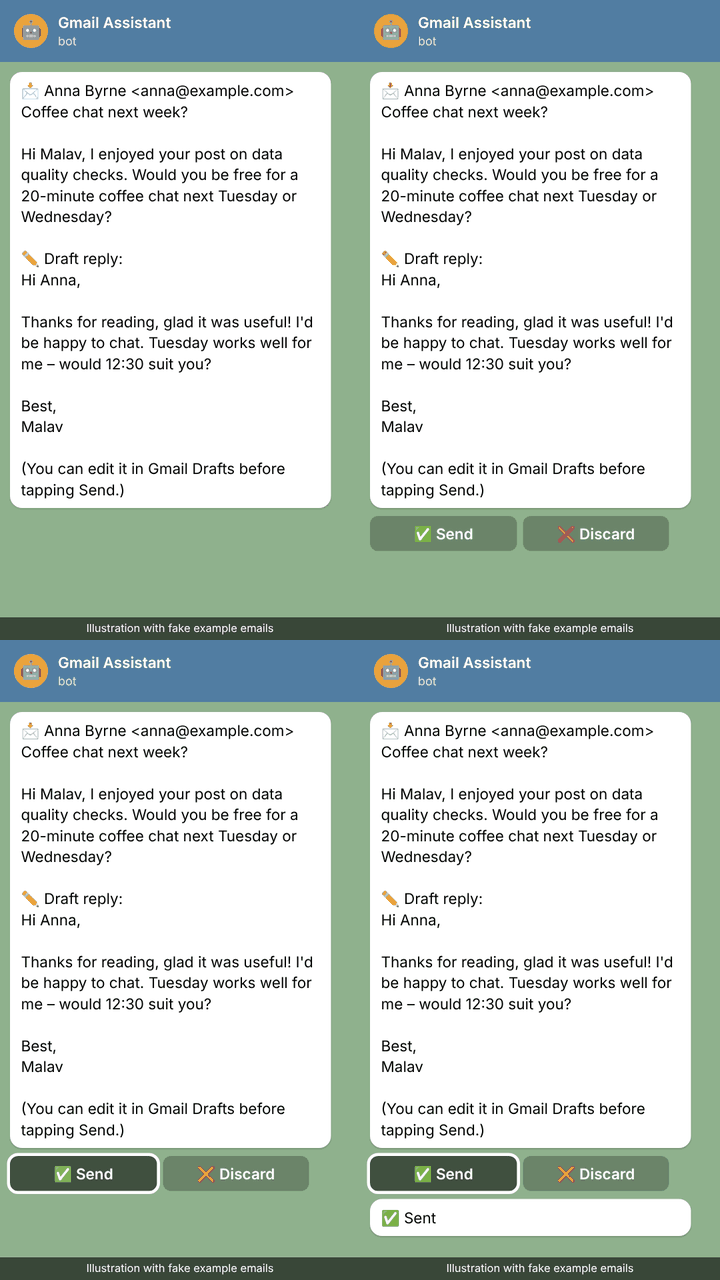
An illustration with a fake example email.
Results
- Built and tested end to end: a routine reply becomes one tap instead of writing it from scratch.
- Every email still gets a human decision – the AI never sends anything by itself.
- Unit tests cover email parsing and correct reply threading.
What I learned
- Treat inputs as untrusted. An email can contain instructions aimed at the AI; the prompt has to say clearly that it’s data, not commands.
- Drafts are the right safety net. Saving to Gmail Drafts means I can always edit before sending, and nothing is lost if the bot stops.
- Small, boring code wins. A few functions, standard libraries and one shared Telegram helper are easy to trust and to test.