Blog automation bot with Telegram approval
A Python bot by Malav Naik that sends weekly blog post previews to Telegram and, only after approval, publishes to GitHub Pages, DEV and LinkedIn via their APIs using GitHub Actions.
- Python
- GitHub Actions
- Telegram Bot API
- DEV (Forem) API
- LinkedIn Posts API
- Jekyll
The problem
I wanted to publish two posts a week on my own site and cross-post them to DEV, LinkedIn and Medium. Doing that by hand means copying text, uploading photos and fixing links four times per post. But fully automatic posting is risky: nothing should go public under my name without me seeing it first.
What I built
A bot that does all the publishing work and waits for one tap from me. Every Monday at 9:00 it sends me previews of my next two posts on Telegram. When I tap ✅, it publishes the post to this blog, then to DEV and LinkedIn, and sends me the 30-second Medium import steps. When I tap ❌, the post waits until next week.
How it works
- Posts are plain Markdown files with front matter (title, tags, photo, where to post, status). Only posts I’ve marked
ready– and with no open fact-check note – are offered. - A GitHub Actions workflow runs every 15 minutes. It reads Telegram button taps (only from my own chat; anyone else’s taps are ignored) and on Mondays sends the week’s previews.
- On ✅ it publishes to my blog first by committing the post to this GitHub Pages site, then waits until the page actually loads before posting anywhere else, so the links never point to a missing page.
- DEV gets the full article with my blog as the canonical (original) source. LinkedIn gets a short post with the photo, an intro and the link, through LinkedIn’s official Posts API.
- Never twice: after each platform succeeds, the bot writes the URL into the post file and commits it straight away. A re-run skips whatever is already done, and a failure on one platform is reported to me in plain words while the others carry on.
- LinkedIn logins expire every ~60 days. The bot reminds me a week before; I log in through a small page on this site and send the code to the bot, which stores the new token securely as a GitHub secret.
Demo
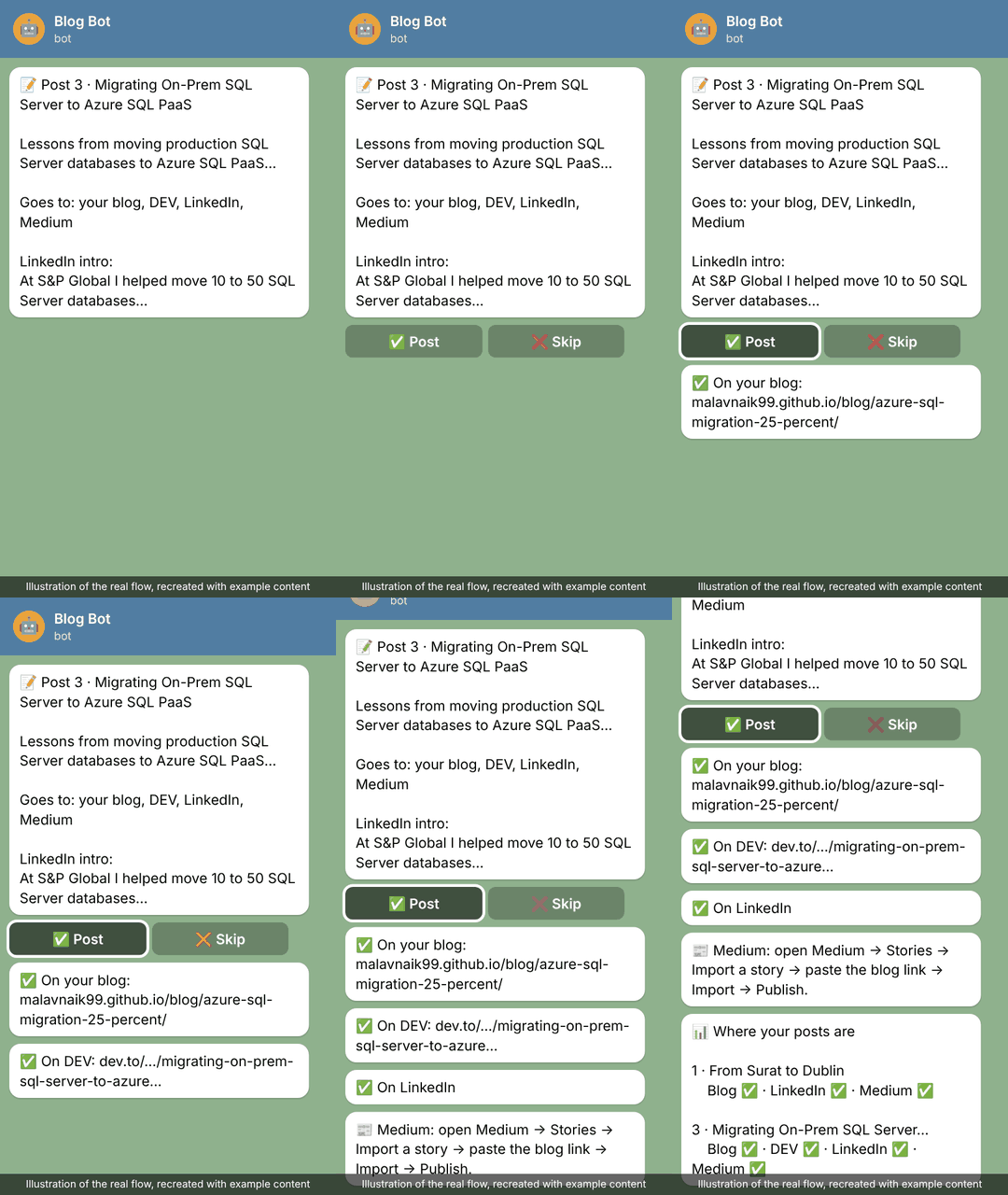
An illustration of the real flow, recreated with example content.
Results
🤖 Automation Lab
Live numbers from my blog automation bot, updated by the bot itself after each post.
- 2 posts published
- Blog: 2
- DEV: 1
- LinkedIn: 1
- Medium: 2
- 48 in the queue
Latest: Migrating On-Prem SQL Server to Azure SQL PaaS: How We Cut Infrastructure Costs by 25% · updated 15 Oct 2026
- In use since October 2026: posts going out to this blog, DEV, LinkedIn and Medium, with one tap each.
- 50 posts queued at two a week; each one takes me about a minute (one tap, plus the Medium import) instead of copying, pasting and re-uploading it on four sites.
- Runs entirely on GitHub’s free tier – no server, nothing to keep switched on.
- 10 automated tests cover post selection, the blog transformation, the never-twice rule, LinkedIn text escaping and login reminders; they run before every bot run.
What I learned
- Human approval is a feature, not a limitation. One tap keeps me in control while the bot does almost all of the work.
- Record progress immediately. Writing each platform’s result before moving on is what makes re-runs safe.
- Use official APIs. LinkedIn and DEV both offer them; browser automation would break their terms and risk the account.